Moving from the Free plan to a paid plan
The Free plan for Hiver Omni is being discontinued on December 27, 2026. If your team is on the Free plan, upgrade to a paid plan by this date to continue using Hiver and accessing your Shared Inbox.
Before you begin
Make sure you have:
- Admin access to your Hiver account. Only Admins can manage plans and billing.
- A valid credit or debit card for payment.
Upgrading to a paid plan
1. Contact customersuccess@hiverhq.com or reply to your Free plan announcement email to have the discount applied to your account.
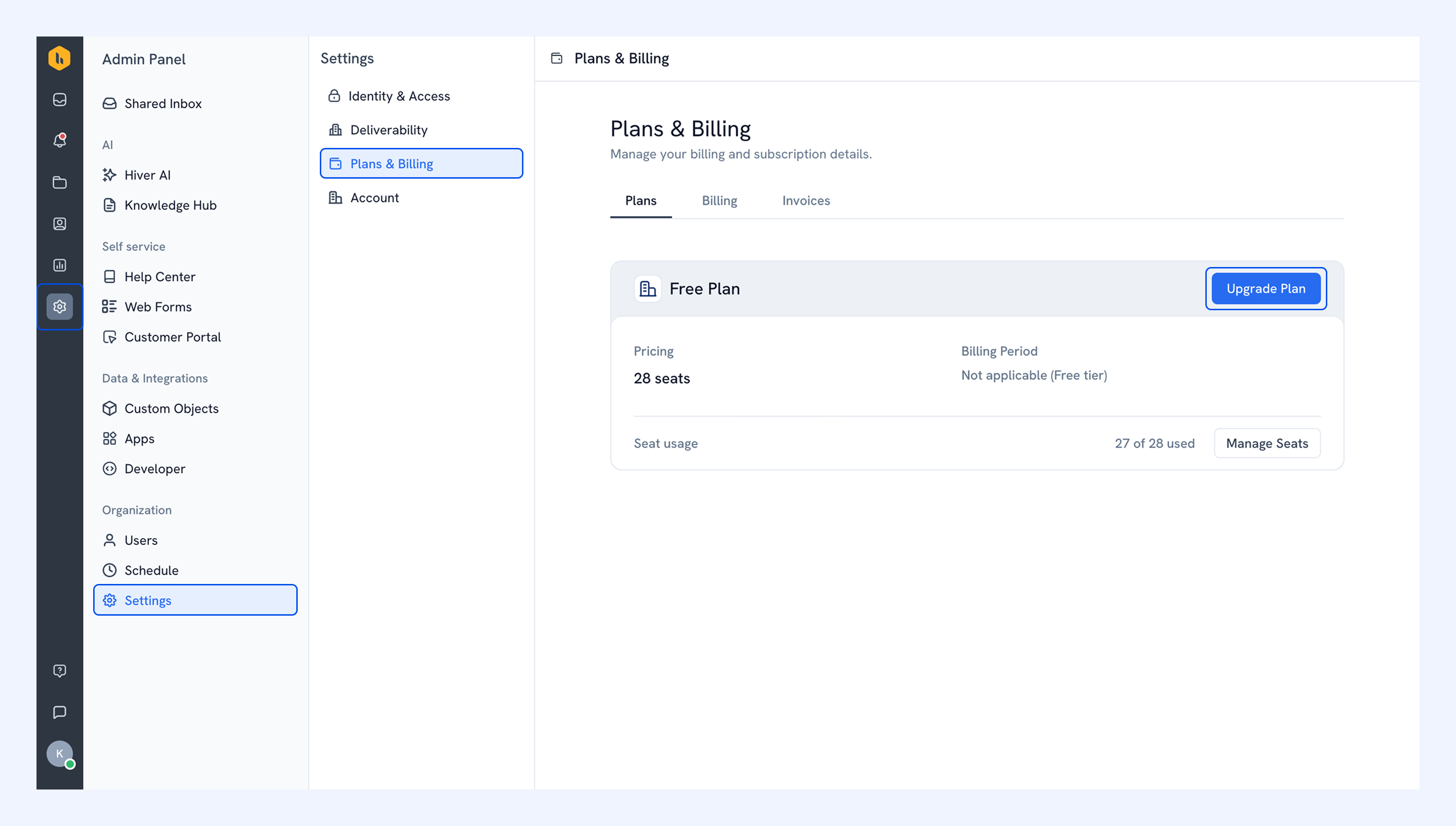
2. Go to Admin Panel → Settings → Plans & Billing, click Upgrade Plan, and choose your plan.
3. Select your seat count and monthly or annual billing.
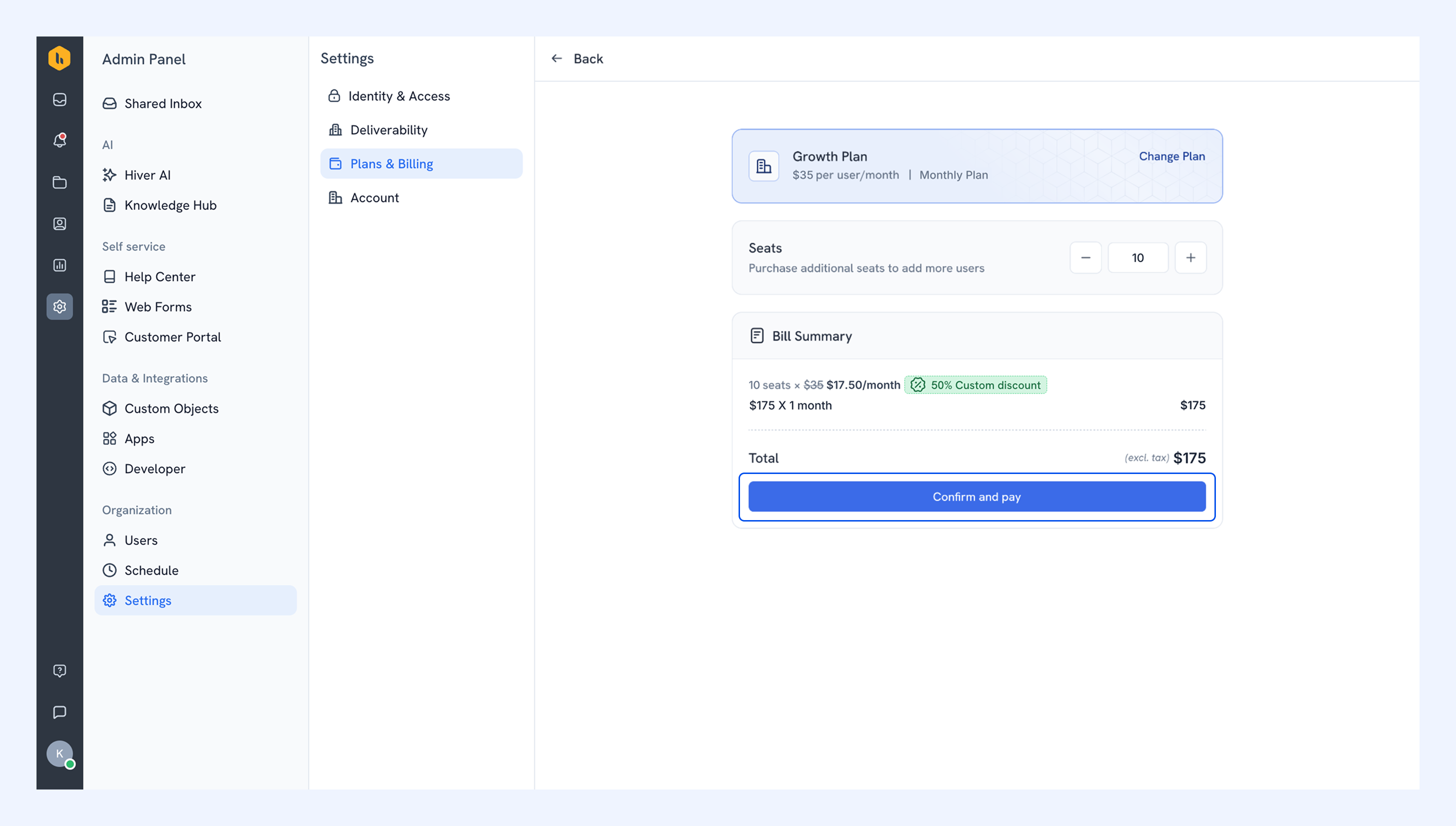
4. Review the subscription amount and confirm with our team that the 50% discount has been applied.
5. Enter your payment details and complete your purchase.
Note: You can upgrade without a call or demo. Contact our team by email to have the discount applied.
FAQs
What happens if I don’t upgrade?
Your team won’t be able to access Hiver after December 27, 2026, including your Shared Inboxes and other account data. If you’re still deciding which plan to choose, you can reach out to us at customersuccess@hiverhq.com. We’re happy to help you find one that works for your team.
Will I keep my conversations and settings when I upgrade?
Yes. Your Shared Inboxes, conversations, teammates, settings, and other Hiver data will stay as they are. You won’t need to set up your account again.
Can I pay monthly instead of annually?
Yes. You can choose monthly or annual billing, whichever works better for your team. You’ll get the 50% discount for the first 12 months with either option.
Does the discount cover add-ons and AI usage too?
The 50% discount covers your plan’s base subscription. Any add-ons and AI usage will be billed separately and aren’t included in the discount.
When does my 12-month discount start?
Your discount starts on the day you purchase your paid subscription.
Do I need to book a call to upgrade?
No, a call isn’t required. If email is easier, contact us at customersuccess@hiverhq.com, and we’ll help you choose a plan and apply the discount. You can complete the upgrade within Hiver.
Will this affect my Gmail or Outlook account?
No. Your emails and settings in Gmail or Outlook won’t be affected by this change. It only affects your access to Hiver.
What should I do if I can’t see the discount?
Our team applies the discount to your account. Email us at customersuccess@hiverhq.com with the email address you use for Hiver, and we’ll take a look. If you’ve already paid, include your invoice reference too so we can review the charge.
What if I miss the upgrade deadline?
Email us at customersuccess@hiverhq.com, and we’ll help you understand your next steps. To keep using Hiver without interruption and use the 50% discount, you’ll need to complete your upgrade by December 27, 2026.
Need help?
Contact customersuccess@hiverhq.com if you need help choosing a plan or completing your upgrade.