Hiver's Apps
In today’s interconnected business environment, teams often juggle multiple tools from CRMs to project management platforms to support customers effectively. Hiver brings all these tools together inside Gmail, so your team can access key data, take action, and manage workflows without leaving their inbox.
What are Hiver Apps
Hiver Apps are out-of-the-box integrations that let you access the tools your team uses right within Gmail. Built on REST API architecture, they pull data from third-party applications directly into your Hiver sidebar in Gmail, so you can view, update, or act on information without switching tabs.
Benefits of Hiver Apps
Hiver Apps simplify how your team works by keeping everything in one place. Here’s what they bring to your daily workflow:
- Unified view: Manage conversations, customer details, and related tasks directly from Gmail.
- Smarter context: Instantly see customer, deal, or order details from connected tools like Salesforce, HubSpot, or Shopify right beside customer conversations.
- Less switching: Eliminate the need to jump between multiple tabs or tools.
- Tailored workflows: Configure each app to match your team’s workflows and needs.
- Secure by design: Built with OAuth 2.0 and API Key authentication to protect your data.
- Scalable and flexible: Hiver connects with your external tools through secure REST API calls.
- Increased productivity: With relevant information visible at a glance, agents can respond faster and more accurately.
Prerequisites
Before you start using Hiver Apps, make sure you have:
- Admin access in Hiver: Only Admins can configure or authenticate new Apps.
- Valid credentials for third-party tools: Ensure you have API keys or OAuth access for connected platforms like Salesforce or HubSpot.
Core capabilities
Hiver’s Apps are powered by three main components:
1. REST API configuration engine
This is the backbone of Hiver Apps that connects external tools to your inbox.
- Works with OAuth 2.0 and API Key authentication for secure access.
- Lets you define API endpoints, headers, and parameters to fetch and update data.
- Ensures secure credential handling and real-time data processing.
2. Pre-built apps library
Get started quickly with our collection of ready-to-use integrations:
- Out-of-the-box connections for Salesforce, HubSpot, Shopify, and other commonly used tools.
- Comes with built-in connections and flexible settings for faster setup.
- Customize any pre-built app to match your workflow.
3. Agent view interface
This is the inbox experience where agents interact with external data.
- Displays customer, deal, or order details right beside each customer conversation.
- Lets you choose the information you want to display in Gmail and keeps the data updated automatically.
- Provides role-based visibility controls so each team member sees only what’s relevant.
Why Hiver Apps stand out
Flexible by design
- Integrate with any REST API–based platform.
- Securely connect with your systems using either OAuth 2.0 or API Key authentication.
- Modify the pre-built apps to match your unique processes and data structures.
- Customize information displayed and define visibility by role or Shared Inbox.
Built for real-world complexity
- Connect multiple systems simultaneously across teams or use cases.
- Scale easily as your business or data structure evolves.
- While pre-built apps work out of the box, you can customize them to match your specific implementation.
Customization and advanced controls
Hiver Apps give you complete control over what data appears, who sees it, and how it’s presented. This helps ensure focus, security, and clarity across teams.
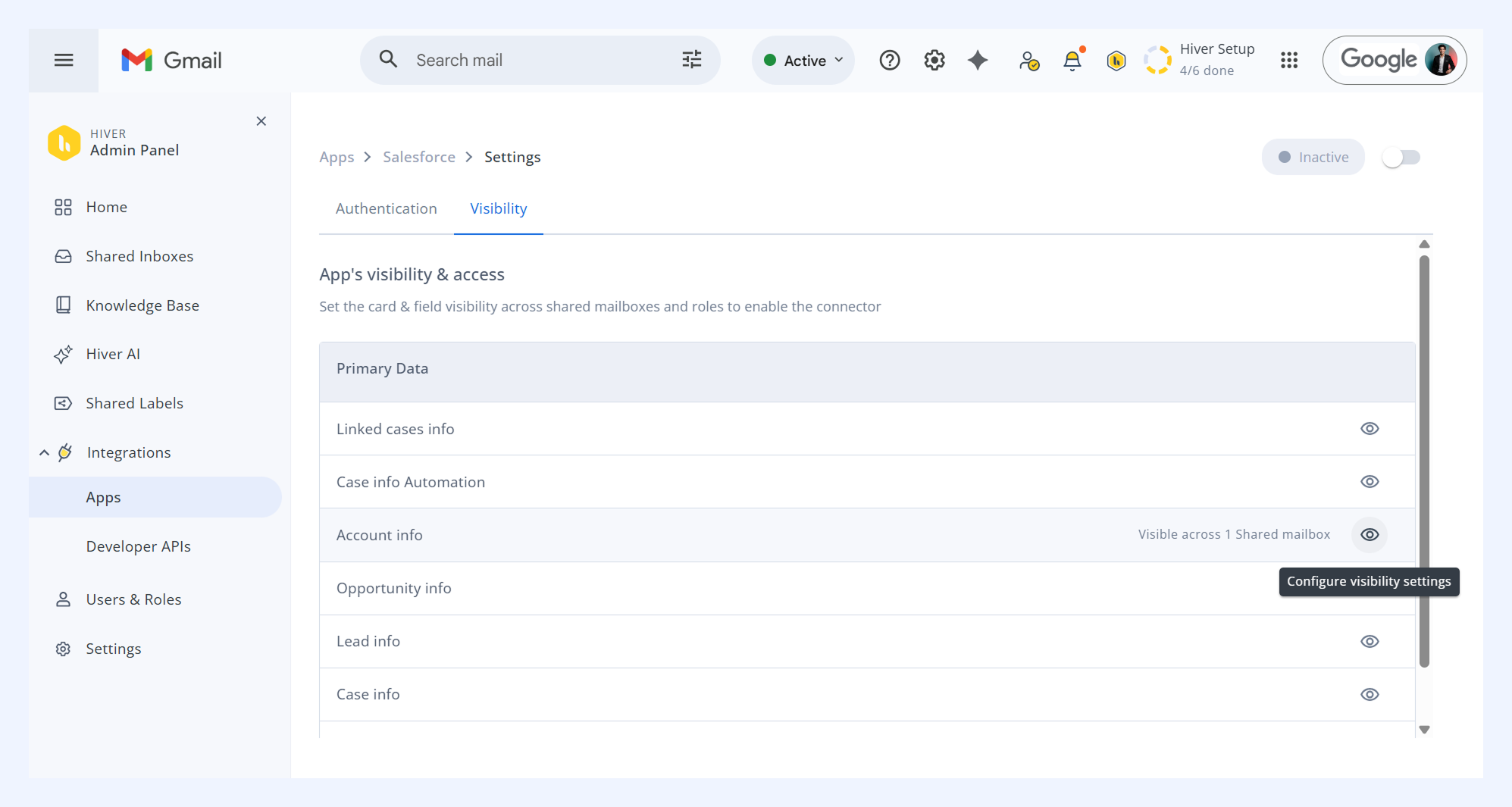
Information card visibility
In Hiver, an information card represents a specific data module or record, such as an order ID, lead, or customer account, from your connected tool. You can control which cards are visible in each Shared Inbox and for which user roles.
Benefits: Keeps data organized by team and prevents clutter from irrelevant information.
Example: Show Salesforce Account info only in the Sales inbox while hiding it from Support.
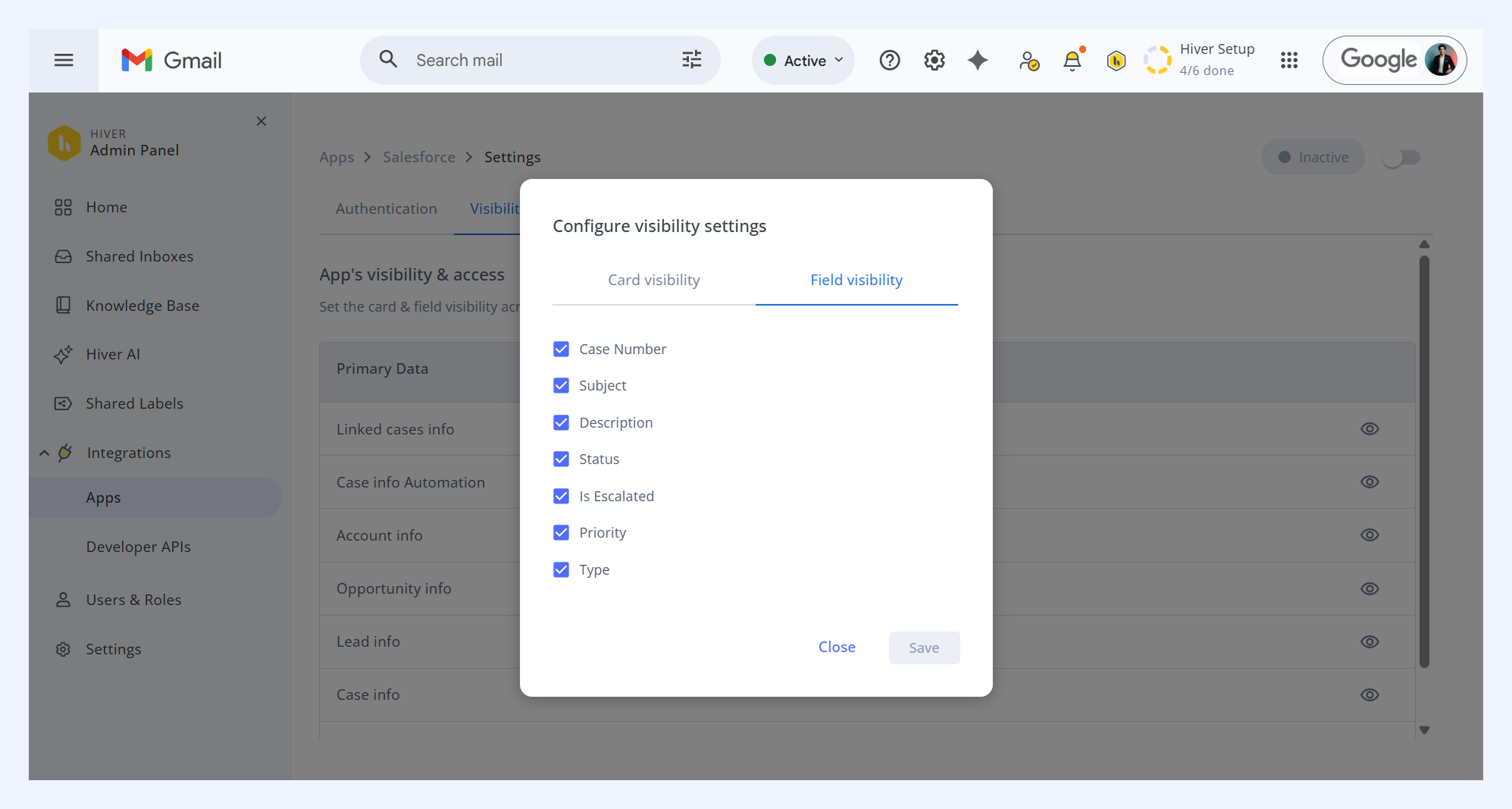
Field visibility
Choose which fields should appear within the information cards.
Benefits: Reduces noise and gives agents a clean, focused view.
Example: In the Case Info card, show only Case Number, Status, and Priority to agents.
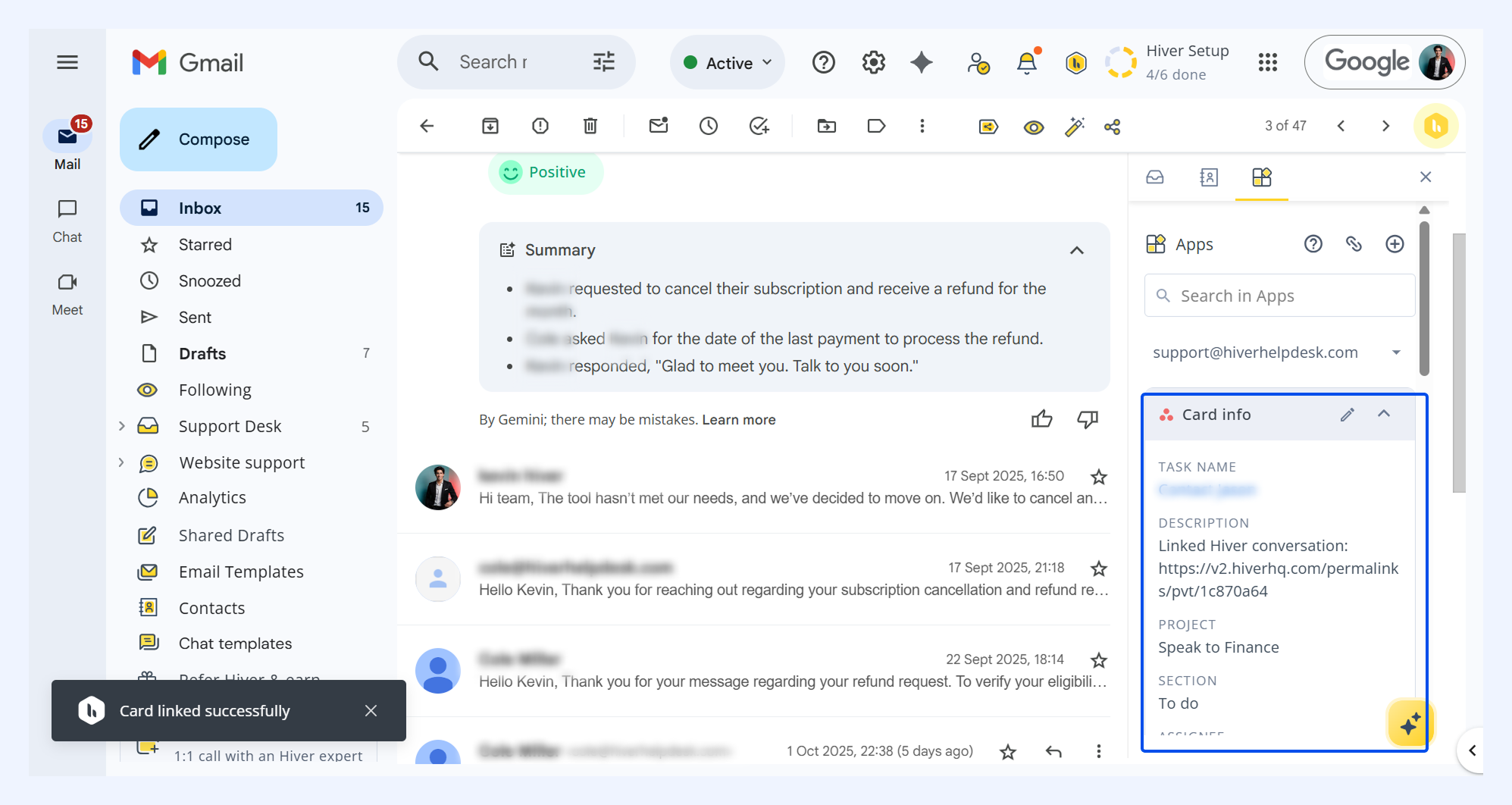
Deep linking
For certain IDs or record fields, Hiver automatically adds deep links that directly take you to the corresponding record in the connected platform.
Benefits: Saves time by removing manual searches and lets agents jump straight to the right record.
Example: Clicking a deal name in Hiver instantly opens the same deal in HubSpot.
Coming soon to Hiver’s Apps
We’re expanding Hiver Apps with more Automation and control:
- Write and update actions: Create or edit records in connected tools.
- Bi-directional sync: Keep data updated both ways.
- Automation triggers: Launch workflows using App data.
- Smarter search: Find records across integrated systems instantly.
Stay tuned as we continue to enhance the Apps module with these powerful features to make your integration experience even more robust and flexible.
Get started with Hiver Apps
1. Go to Hiver settings → Admin Panel → Integrations → Apps → select a pre-built app or request a custom one.
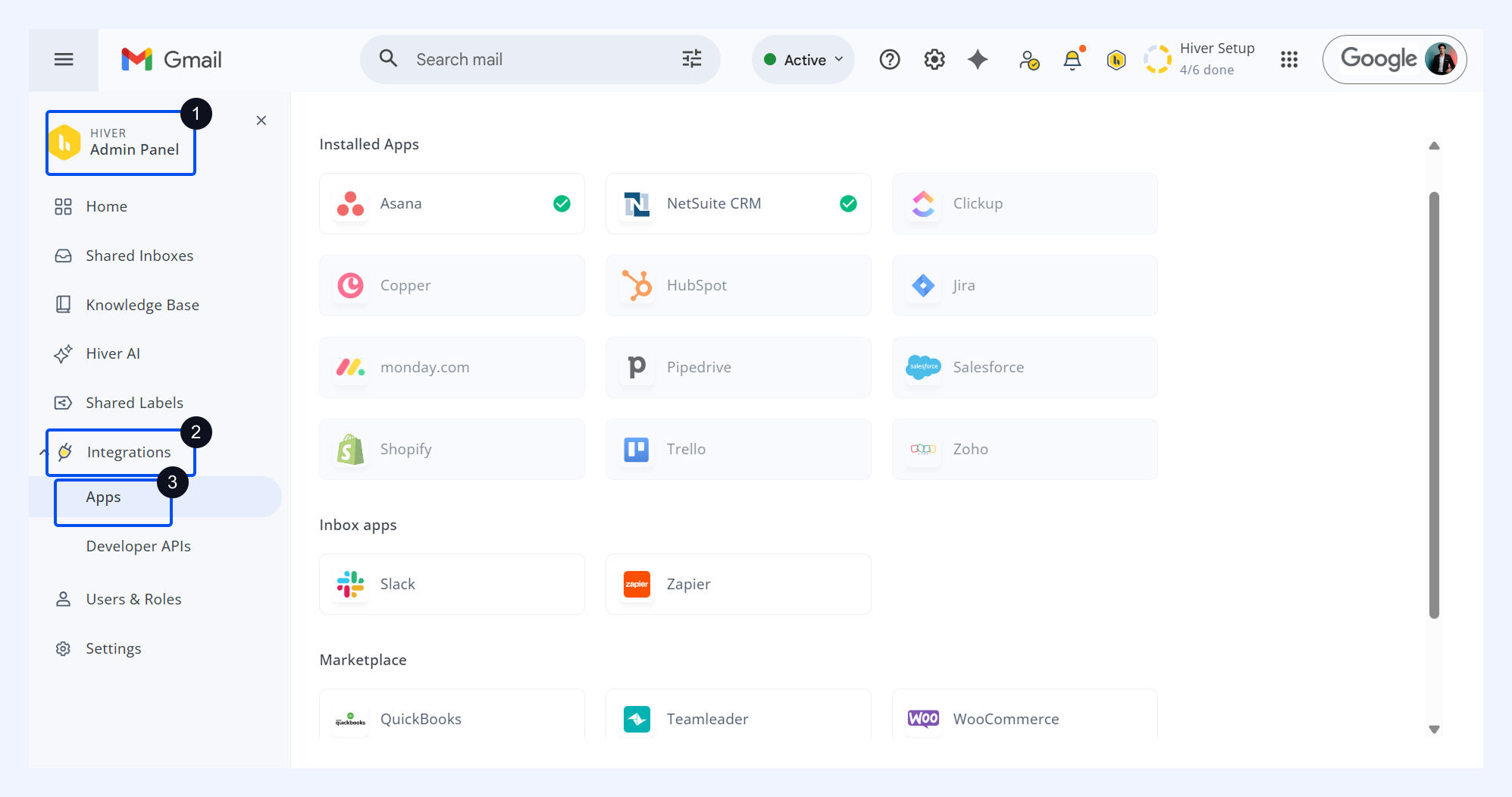
2. Select Click to authenticate and follow the authentication steps. Once connected, turn the toggle on to start using the App.
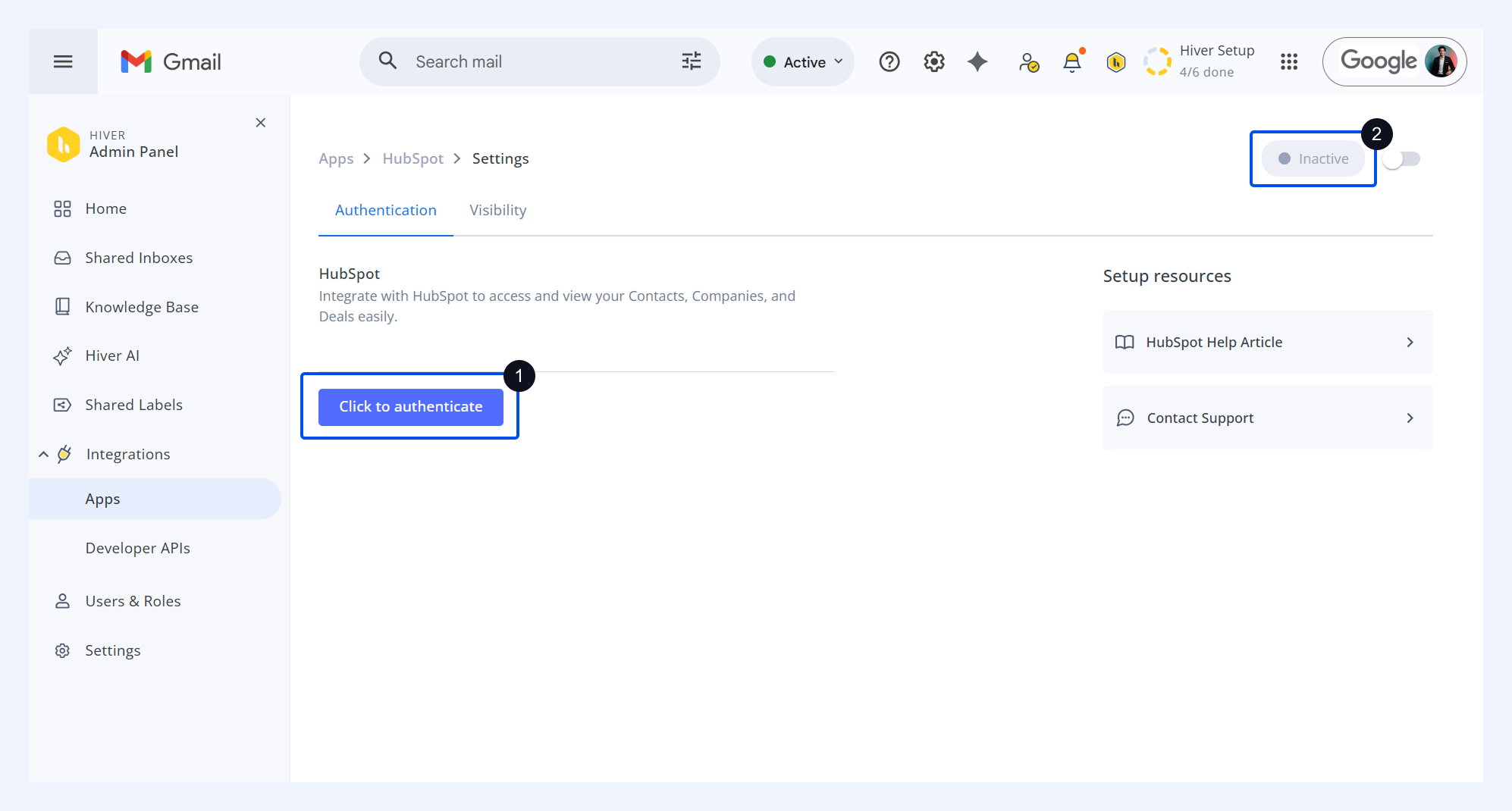
You can start accessing integrated data directly in your right panel beside your conversations.
Need help?
We’re here to help you set up, customize, and optimize your integrations.
Email support@hiverhq.com for guidance on app setup, field mapping, or training.