Sentiment report
Hiver’s AI Sentiment Analysis detects customer tone and classifies conversations as Positive, Neutral, or Negative, or on a five-point scale from Very Positive to Very Negative. This helps your support team understand not just what customers are saying, but how they feel when reaching out.
Sentiment report turns these classifications into actionable insights. Instead of manually going through emails, you can quickly see overall customer mood, trends over time, and which teams or agents are receiving specific types of sentiment.
Understanding AI sentiments
- Very positive: Strongly appreciative or delighted tone.
- Positive: Appreciative or satisfied tone.
- Neutral: Informational or follow-up messages without strong emotion.
- Negative: Frustrated or unhappy tone.
- Very negative: Strongly dissatisfied or escalated tone.
Steps to view sentiment report in Hiver
1. Go to Analytics → Reports → select your Shared Inboxes → Reports → Sentiment.
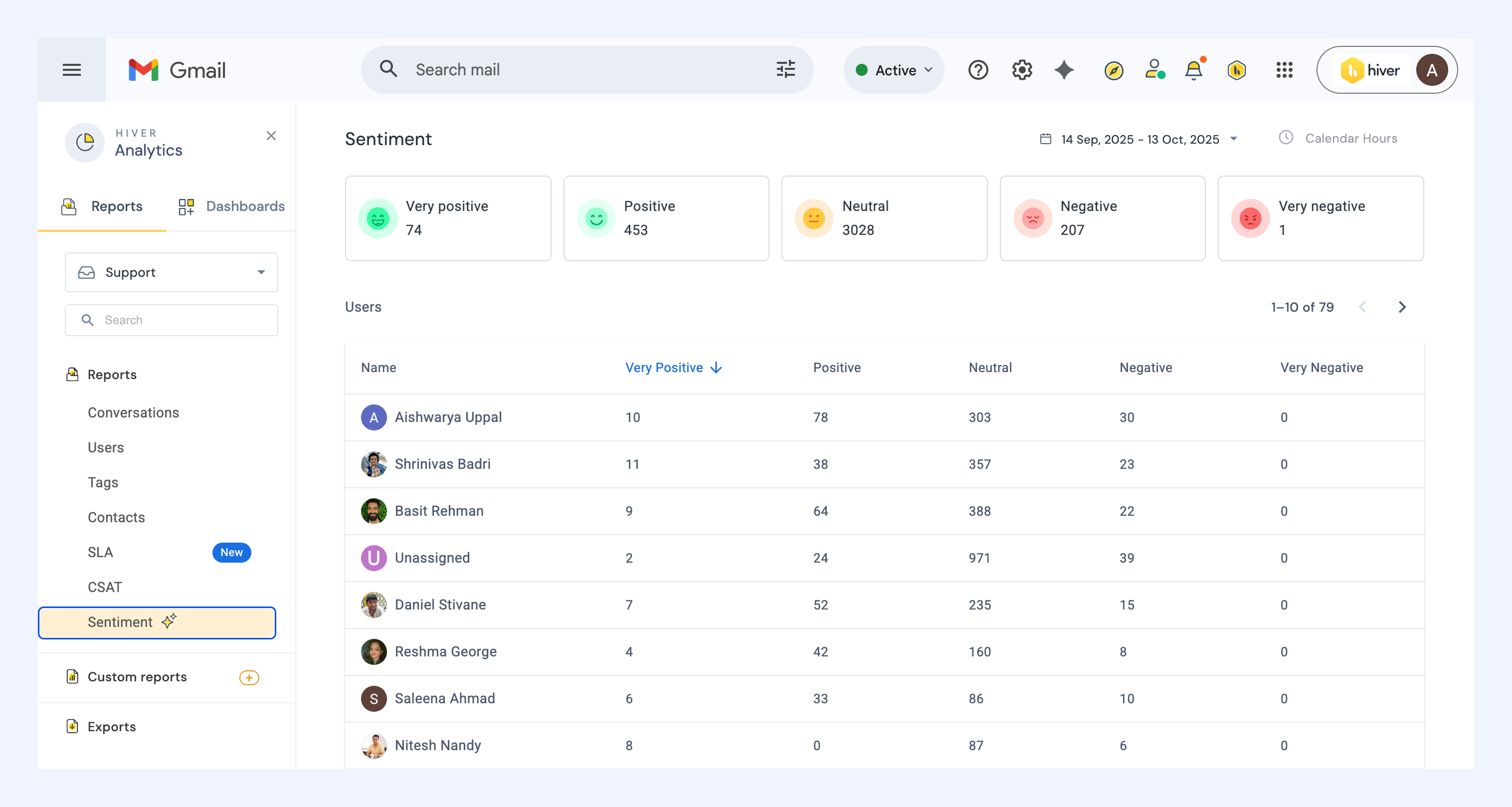
2. The report displays sentiment tiles showing the total number of conversations in each category for the selected inbox.
3. Below the summary, you’ll find a user-level breakdown, showing how many conversations each agent handled under each sentiment type.
4. You can click any user to see the conversations handled, along with details like the subject and sender address and a breakdown of Sentiment insights.
Analyzing Sentiment data
Use this report to:
- Identify the distribution of Positive, Neutral, and Negative conversations (or the full five-point range).
- Track trends in customer emotions across different time ranges.
- Analyze user-level sentiment patterns to see who handles more negative or positive interactions.
- Assess the overall customer experience health at a glance.
- Spot training or workload imbalances if certain agents consistently receive more negative sentiment.
- Click any sentiment label to review related conversations and understand tone drivers.